Making Shopping Cart Loads Feel Instant
A retrospective on rendering, caching, and perceived performance.

Around five years ago, I worked on Shopee's React Native shopping cart for users across regions. Indonesia was an especially demanding environment because more users relied on low-end Android devices and slower networks. Before the improvements, overall cart load time was around 11 seconds at p80.
The network was part of the problem, but not the whole problem. JavaScript work and rendering also competed for the same limited CPU. The most useful changes came from looking at both what the cart did and when it did it.
Virtualization is only as granular as your list items
The list structure was one source of unnecessary work. Each FlatList item represented an entire shop, including its products, promotions, and other components. A tall shop could extend well below the viewport, so rendering a few shop items could still mount plenty of off-screen content.
I restructured the list so shop headers, products, and promotions became smaller list items. We kept FlatList and its virtualization, but applied it at a finer granularity. initialNumToRender then controlled smaller units of work. The tradeoff still mattered: rendering too few rows could leave more work for scrolling, and FlatList batches and windows rows rather than skipping every off-screen item automatically.
The rendering release brought cart p80 from about 5 seconds to about 3 seconds. Later rendering refinements brought it from around 3 seconds to about 2.5 seconds.
Switch between whole-shop and single-row items, adjust initialNumToRender, and scroll the same mock cart. The timings are synthetic; the demo illustrates the tradeoff between initial work and scrolling, not a replay of production measurements.
Keep the cart ready before it opens
Users often add an item and continue browsing before opening the cart. A straightforward first step was to overlap the cart request with page setup.
Prefetch while the page initializes
The page started its cart GET while initialization was still running, then awaited the promise already in flight when it needed the data. I extracted the pattern into a shared library so other pages could use it. On flows such as checkout and product details, it reduced initial load time by as much as 50%.
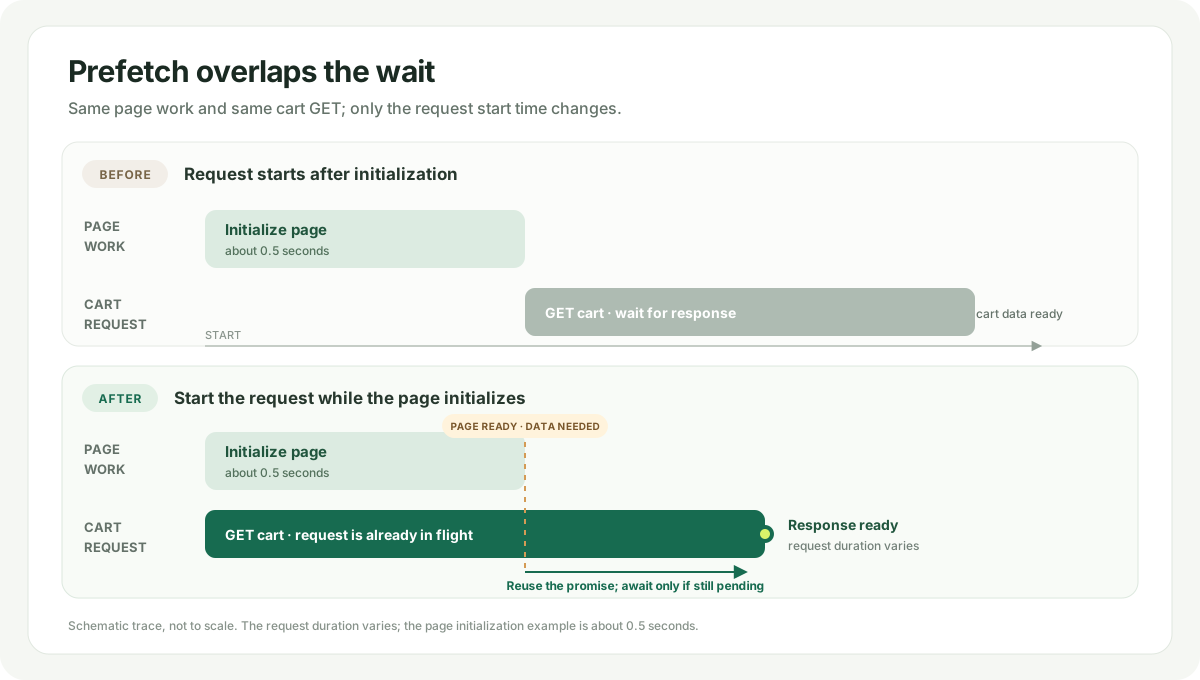
Prefetching hides some request latency, but it does not keep the cache current while the user continues browsing or makes changes on another device. Refreshing after every cart change can also waste bandwidth and increase backend traffic during major campaigns, such as flash sales. That led to the less obvious part: updating a useful local cart in the background.
Incremental background updates
I proposed an incremental cart GET API to the backend team so the client could request changed cart data and update its local state without replacing the whole cart. The request carried a timestamp cursor that marked where the delta should start. Backend owned the endpoint implementation; I shaped the client requirement and worked with them on the partial-get behavior.
The shape below is illustrative; field names are schematic. The timestamp is a cursor that tells the server where the client wants the change set to begin:
GET /cart?timestamp=<cursor>

{
  "cart_list": [
    { "shop_id": "shop-42", "item_ids": ["item-8", "item-23", "item-42"] }
  ],
  "item_details": [
    { "id": "item-23", "quantity": 2, "price": 12.50 },
    { "id": "item-42", "quantity": 1, "price": 5.25 }
  ]
}
The cart list included only changed shops and their current item membership. Suppose the cached membership for shop-42 was [item-5, item-8, item-23]. In the response, item-5 is absent, so it was deleted; item-8 remains unchanged, item-23 is updated, and item-42 is added. Item details were sent only for added or updated items. A shop omitted from the partial response was unchanged, so the client could merge the delta without replacing the whole cart.
The app already received native cart-change notifications to keep the cart icon's item count current. I proposed using that signal to start a lightweight background fetch, including when a change came from another device, instead of waiting for the cart screen to open.
There was a second part to the design: the app could know that its cache might be stale before the background update had finished. I proposed using the familiar pull-to-refresh UI as a subtle freshness cue. When the cart opens in that state, the cue appears automatically; the user does not have to pull, and the cart does not block on the request.
The cue communicates uncertainty, not truth. The cache can be stale without a cue if a notification has not arrived, which can make rows visibly jump when updated data appears. It can also be fresh while a cue is shown—for example, if the cart has not been opened in a while and the check finds no changes.
Choose whether the data is actually fresh and whether the app shows a cue. The four cases separate the underlying truth from what the app knows. The two no-cue cases use the same normal cart-load check; the outcomes differ only in whether that response changes the cached rows.
Keeping cart data fresh
On 85% of cart loads, the cache had fresh data and no staleness cue was needed. The remaining cases were not all stale or all cued; freshness and the cue were separate outcomes. When a change was known but its background update had not completed, the cart stayed usable and showed the automatic refresh cue.
Across the full optimization, cart load time improved from around 11 seconds to around half a second at p80, and from around 20 seconds to under 1 second at p95.
Looking back
The work combined three kinds of performance improvement:
- Reduce work on the critical path by rendering smaller units only as needed.
- Start useful requests while the page initializes.
- Keep the local cart current in the background, and communicate when freshness is uncertain.
The last approach had the biggest effect on perceived loading time, but it depended on the first two—and on being honest about freshness. A cart can be immediately useful without being guaranteed current. The interface needs to communicate that uncertainty while the system catches up.
About the author
- I’m a frontend engineer based in Singapore, with seven years building web and mobile software at Shopee, TikTok, and Hopper.
Comments
Join the discussionNo comments yet. Be the first to comment.